
Category: technical documentation

Technical Wiring in 2025

Why Technical Documentation Shapes Product Success in 2025

In the world of software, electronic hardware, and semiconductor products, innovation alone is no longer enough. Companies across India and around the globe invest heavily in engineering, yet many overlook a crucial element that shapes customer trust, accelerates adoption, and reduces support overhead: high-quality technical documentation.

In 2025’s hyper-competitive product landscape, documentation no longer sits at the periphery. It acts as a product’s voice—clear, consistent, and always available. When done well, it shortens onboarding time, enables faster integrations, reduces back-and-forth with support teams, and elevates the customer experience.

Documentation: A Strategic Advantage, Not a Checklist

Organizations today realize that documentation functions as an extension of engineering. Great documentation:

  • Makes complex workflows feel intuitive

  • Communicates product value without a sales pitch

  • Reduces dependencies on engineering resources

  • Strengthens a company’s brand identity

  • Lowers support costs significantly

This is especially true in industries such as SaaS, cybersecurity, data centers, IoT devices, and semiconductor solutions, where precision and clarity directly affect how users experience the product.

Why Many Companies Struggle

Even large engineering teams face recurring challenges:

  • Engineers lack the time bandwidth to write

  • Documentation styles vary across teams

  • Releases move fast, and docs fall behind

  • Hardware and semiconductor workflows require specialized domain expertise

  • Internal teams rarely have dedicated writers trained for deep technical content

This is why organizations increasingly partner with specialized documentation agencies that understand both technology and user experience.

The Rise of Expert Technical Writing Partners in India

India continues to emerge as a global destination for technical content excellence. Among these, Mindivik stands out for its deep specialization in software products, electronic hardware, and semiconductor documentation.

Its approach focuses on:

  • Understanding product architecture deeply

  • Writing with clarity, accuracy, and industry alignment

  • Standardizing documentation across teams

  • Integrating seamlessly with existing engineering processes

  • Helping companies build scalable documentation ecosystems—not just one-off manuals

What sets such agencies apart is their ability to translate engineering brilliance into documentation that resonates with users, partners, and enterprise clients.

Technical Documentation Is Now a Growth Lever

Companies that treat documentation as a strategic investment—not an afterthought—experience:

  • Faster customer onboarding

  • Fewer support tickets

  • Increased adoption of advanced features

  • Higher customer satisfaction

  • Better perception of brand quality

As products become more technical and more global, clear documentation becomes an undisputed competitive advantage.

A Quiet Shift in the Industry

Across India’s software and semiconductor ecosystems, a subtle but powerful shift is underway: companies are strengthening their documentation with skilled partners who understand the complexity of modern tech stacks.

Agencies like Mindivik support this shift by providing the clarity, structure, and domain-specific expertise that modern product teams expect.

In a world where users move fast and attention spans are short, clarity wins—and documentation becomes the difference between a product that gets adopted and a product that gets abandoned.

How Much Money Do Product Companies Save With Great Technical Documentation?

How Much Money Do Product Companies Save With Great Technical Documentation?

Most product leaders agree that documentation matters — but very few quantify how much it impacts the bottom line.
What I’ve seen across companies confirms a powerful truth:

👉 Good technical documentation is not a cost center. It is a profit multiplier.

Across industries, well-structured documentation consistently reduces support load, accelerates onboarding, and increases product adoption. When companies invest in documentation, they don’t just create manuals — they create operational efficiency.

So let’s talk numbers.


The Real Impact: 15% to 60% Savings in Support Costs

Multiple industry studies and customer reports consistently show that 15% to 60% of support tickets get deflected when companies maintain clear, searchable, up-to-date documentation.

Why?
Because users find answers before they raise tickets.

And every ticket avoided is time saved for your support team — and money saved for the company.

Support teams with solid self-service documentation often experience:

  • Fewer repetitive “how-to” queries

  • Reduced average handling time

  • Lower dependency on L1 and L2 support

  • Faster customer resolutions

  • Higher customer satisfaction

The result?
Lean teams delivering better experiences at substantially lower cost.


Documentation Also Cuts Internal Costs

This is the part most companies underestimate.

When engineering teams have reliable internal documentation — API docs, architecture overviews, troubleshooting guides — productivity jumps significantly.

Research shows:

  • 10% to 40% improvement in developer efficiency

  • Much faster onboarding for new engineers

  • Fewer escalations to senior technical staff

  • Reduced rework due to better clarity

One study even showed new developer ramp-up occurring up to 75% faster when documentation is structured and accessible.

That’s not just an engineering win — that’s a business win.


A Simple Example

Let’s say a product company spends ₹8 crore per year on support and engineering time combined.

If documentation reduces ticket volume and internal inefficiencies by even 30%, that’s:

👉 ₹2.4 crore saved annually

And this happens every single year.
Documentation compounds ROI.


Why Documentation Delivers Such Large Savings

The efficiency comes from four key levers:

  1. Ticket Deflection – fewer support tickets mean lower support costs.

  2. Resolution Acceleration – better docs shorten MTTR and AHT.

  3. Team Productivity – engineers spend more time building, less time explaining.

  4. Faster Onboarding – new hires become productive earlier.

The companies that achieve the highest ROI treat documentation as a living product — not an afterthought.


The Big Takeaway

If your product has users, customers, or internal teams, you are already paying the price for poor documentation — whether you realize it or not.

But when you invest in clear, updated, intelligently structured docs, the savings show up quickly:

💡 15%–60% reduction in support load
💡 10%–40% boost in engineering productivity
💡 Faster onboarding, fewer escalations, happier users

Documentation is not just a technical asset.
It is one of the most cost-effective business levers available to any product company.

And the companies that understand this early are the ones that scale smoothly.

Knowledgebase to profit

A Knowledge Base to Drive Traffic & Boost Sales 🚀

In today’s digital era, every product company dreams of having a website that not only attracts visitors but also converts them into customers. Yet, most companies overlook one of the most powerful tools for achieving this — a knowledge base.

A well-structured knowledge base doesn’t just serve existing customers. It also acts as a magnet for new users, quietly driving organic traffic, improving brand credibility, and eventually increasing sales. Here’s how 

1. Knowledge Bases Bring Consistent Organic Traffic

When a company publishes help articles, FAQs, setup guides, and troubleshooting content, it naturally builds a rich collection of SEO-friendly pages.

Each of these pages targets specific keywords — often the ones your potential customers are typing into Google while researching or comparing solutions.

For example:

  • “How to integrate CRM with email marketing”

  • “Best way to manage team access to SaaS apps”

  • “Troubleshooting mobile login errors”

These long-tail searches may not directly lead to purchases, but they introduce new users to your product ecosystem. Over time, this builds organic traffic that’s highly relevant and cost-effective — no paid ads needed.

2. It Establishes Authority and Trust

People buy from brands they trust.

When potential customers land on your knowledge base and see detailed, well-organized content, they perceive your company as credible, transparent, and customer-focused.

It’s like saying, “We know our product inside out, and we care enough to guide you every step of the way.”

This confidence often tips the scale in your favor when users are comparing multiple solutions.

3. It Reduces Friction in the Buying Journey

A knowledge base answers pre-sales questions too — not just support queries.

Imagine a potential buyer wondering:

  • “Can this software integrate with my existing tools?”

  • “Does this product support my platform?”

  • “What happens if I face an issue?”

If your knowledge base addresses these upfront, it removes hesitation and shortens the decision cycle.

The result: visitors convert faster, and your sales team spends less time answering repetitive questions.


4. It Supports Customer Success — Which Fuels Word of Mouth

Once customers find your product easy to understand and use, they become advocates.

A detailed knowledge base ensures smooth onboarding, quicker issue resolution, and reduced frustration — leading to higher satisfaction and retention.

And satisfied customers don’t just stay; they refer others, bringing in new traffic and sales organically.


5. It Powers Continuous SEO Growth

Your knowledge base isn’t static — it grows with your product.
Every update, new feature, or release brings new topics and keywords to target.

When search engines see regular content updates, they index your site more frequently. Over time, this builds a compounding SEO advantage that even your competitors will struggle to match.


In Short

A professional knowledge base is not just a support tool — it’s a growth engine.
It attracts visitors through SEO, builds credibility through transparency, nurtures buyers with helpful content, and retains customers by empowering them.

If your goal is to drive consistent traffic and increase sales, start treating your knowledge base as an integral part of your marketing strategy — not just a support resource.

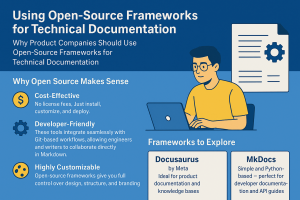
🚀 Why Product Companies Should Use Open-Source Frameworks for Technical Documentation

In today’s fast-moving product ecosystem, technical documentation is no longer just an afterthought — it’s the heartbeat of customer experience and internal efficiency. Yet, many companies still spend huge amounts on complex documentation tools that are expensive, rigid, and hard to scale.

💡 The smarter alternative? Open-source documentation frameworks like Docusaurus, Docsify, or MkDocs.

These frameworks are transforming how product and engineering teams create, maintain, and publish documentation — without breaking the bank.

Docsify

🔍 Why Open Source Makes Sense

  1. 💰 Cost-Effective:
    No license fees. Just install, customize, and deploy. You get enterprise-level documentation at a fraction of the cost.

  2. ⚙️ Developer-Friendly:
    These tools integrate seamlessly with Git-based workflows, allowing engineers and writers to collaborate directly in Markdown — the same way they handle code.

  3. 🌐 Easy Publishing:
    Deploy instantly on GitHub Pages, Netlify, or Vercel. No server management, no complicated setup.

  4. 🎨 Highly Customizable:
    Open-source frameworks give you full control over design, structure, and branding — unlike many closed SaaS tools that lock you into templates.

  5. 🚀 Fast, Lightweight & Scalable:
    The generated static sites are blazing fast, SEO-friendly, and scalable for both small startups and large enterprises.


🧠 Frameworks to Explore

  • Docusaurus (by Meta): Ideal for product documentation and knowledge bases. Built on React with plugin flexibility.

  • Docsify: Great for lightweight, real-time documentation that doesn’t need a build process.

  • MkDocs: Simple and Python-based — perfect for developer documentation and API guides.


🧩 Real Impact for Product Teams

Using these frameworks, product companies can:
✅ Build a centralized knowledge base for teams and customers.
✅ Enable faster onboarding for new users and developers.
Version documentation easily alongside product releases.
✅ Reduce dependency on proprietary tools and recurring costs.


💼 How I Help

I help product companies design and deploy cost-effective, scalable documentation ecosystems using open-source frameworks like Docusaurus, Docsify, and MkDocs — ensuring their teams can focus on innovation, not tool limitations.


📘 If you’re a product leader or documentation manager looking to modernize your documentation stack, let’s connect. Together, we can build a future-ready documentation system that saves time, money, and effort.

#TechnicalWriting #Documentation #Docusaurus #Docsify #MkDocs #KnowledgeBase #Productivity #OpenSource

Eight Steps to Creating API Documentation Using Swagger

Eight Steps to Creating API Documentation Using Swagger

Eight Steps to Creating API Documentation Using Swagger

API documentation is a type of technical documentation that describes the interface of an application programming interface (API). An API is a set of protocols, routines, and tools that developers use to build software applications. API documentation provides detailed information about how to use the API, including the available endpoints, parameters, request and response formats, authentication and authorization mechanisms, error handling, and other relevant details.

API documentation helps developers to understand how to use the API and integrate it with their applications. It also provides a reference for developers to use when troubleshooting issues with their API integrations. Additionally, API documentation can be used by technical writers to create user guides, tutorials, and other types of end-user documentation that help non-technical users understand how to use the API.

Install the Swagger Editor

The Swagger Editor is an open-source editor that enables you to write, design, and document RESTful APIs in the OpenAPI specification format. Install it on your local machine or use the online version.

Create a new Swagger/OpenAPI document

To create a new document, open the Swagger Editor and click “File” > “New Swagger/OpenAPI Document.”

Define your API Endpoints

Use the “paths” section to define your API endpoints, including their HTTP methods, parameters, and responses. You can also add descriptions, tags, and examples to make your documentation more comprehensive.

Define Your Data Models

Use the “definitions” section to define your data models, including their properties and data types.

Add security definitions

Use the “securityDefinitions” section to define the authentication and authorization mechanisms used by your API.

Add Documentation and Metadata

Use the “info” section to add general information about your API, such as its title, version, description, and contact information.

Validate your Swagger document

Use the Swagger Editor’s built-in validator to validate your Swagger document for syntax errors and best practices.

Export your Swagger Document

Once your Swagger document is complete, you can export it in various formats, such as JSON or YAML, and use it to generate documentation in different formats, such as HTML, Markdown, or PDF.

Keep in mind that this is just a general guide, and the process may vary depending on the specific tools and technologies you’re using. I recommend checking out the official Swagger documentation for more information and resources.

About the Author: Yogesh Sharma is the founder and CEO of Mindivik, which is a technical documentation company based out of Noida, India.

www.mindivik.in
www.facebook.com/mindivik
https://linkedin.com/company/mindivik

Seven Key Elements of a Technical Documentation Plan

Seven Key Elements a Technical Documentation Plan

Seven Key Elements of a Technical Documentation Plan

Technical documentation is an essential part of any software development project. It provides a clear and concise explanation of the system and its components, which is essential for the development, maintenance, and support of the system. A well-designed technical documentation plan is critical to ensure that the documentation is effective and efficient. In this article, we will explore the elements of a technical documentation plan that will help you create effective and efficient technical documentation.

Purpose and Scope

The first and foremost element of a technical documentation plan is to define the purpose and scope of the documentation. It is essential to clearly define what the documentation aims to achieve and what it covers. The purpose of the documentation could be to explain the system’s functionality, to provide installation instructions, to guide users through a troubleshooting process, or to provide API documentation for developers. The scope of the documentation should outline what is included and excluded in the documentation. This will help to manage expectations and ensure that the documentation remains focused.

Audience and User Persona

The second element of a technical documentation plan is identifying the target audience and their user persona. It is crucial to understand who will be using the documentation and what their needs are. The audience could be software developers, system administrators, end-users, or technical writers. Understanding their user persona will help you tailor the documentation to their needs, knowledge level, and technical skills. For example, documentation targeted at software developers would need to be more detailed and technical than documentation aimed at end-users.

Document Structure and Format

The third element of a technical documentation plan is deciding on the document structure and format. The document structure should be intuitive and easy to navigate. A table of contents, index, and glossary can make it easier for users to find the information they need. The format of the documentation could be a PDF, HTML, or a wiki. It is essential to choose a format that is user-friendly and accessible to the intended audience.

Documentation Tools and Software

The fourth element of a technical documentation plan is selecting the documentation tools and software. The tools and software used to create the documentation should be easy to use, scalable, and able to meet the documentation’s needs. The tools could be a word processor, a markdown editor, a wiki platform, or a content management system (CMS).

Content Creation and Management

The fifth element of a technical documentation plan is content creation and management. The content creation process should be well-defined, and the content should be accurate, up-to-date, and relevant. A style guide and template can help ensure consistency in the documentation’s tone, voice, and formatting. A content management system can be used to manage the documentation, making it easier to update and maintain.

Review and Feedback

The sixth element of a technical documentation plan is to incorporate a review and feedback process. The documentation should be reviewed by subject matter experts, technical writers, and end-users to ensure accuracy, completeness, and usability. Feedback should be encouraged and incorporated to improve the documentation continually.

Distribution and Access

The final element of a technical documentation plan is the distribution and access of the documentation. The documentation should be easily accessible and distributed to the intended audience. The distribution method could be online, offline, or both, depending on the audience’s needs.

In conclusion, technical documentation is a critical component of any software development project. A well-designed technical documentation plan can ensure that the documentation is effective, efficient, and meets the needs of the intended audience. The elements of a technical documentation plan discussed in this article should help you create effective and user-friendly technical documentation.

About the Author: Yogesh Sharma is the founder and CEO of Mindivik, which is a technical documentation company based out of Noida, India.

www.mindivik.in
www.facebook.com/mindivik
https://linkedin.com/company/mindivik

Nine Key Elements Your Technical Documentation Needs

Nine Key Elements Your Technical Documentation Needs

Nine Key Elements Your Technical Documentation Needs

Technical documentation plays a vital role in any technical product or service, as it provides users with essential information on how to use the product or service efficiently and effectively. However, creating effective technical documentation can be a daunting task, and it requires careful planning and execution. In this article, we will discuss nine key elements that your technical documentation needs.

Clear and Concise Language

The language used in technical documentation must be clear, concise, and easy to understand for the target audience. Avoid using complex sentence structures, jargon, or technical terms that may confuse the users. Keep the tone of the documentation user-friendly, and use language that is appropriate for the level of technical expertise of the users.

Structured Information

Technical documentation should be structured in a logical and hierarchical manner. Organize the information into sections or chapters with clear headings and subheadings. Use bullet points, lists, and tables to make the information more readable and digestible.

Comprehensive Information

Your technical documentation should be comprehensive and cover all aspects of the product or service, from installation and setup to troubleshooting and maintenance. Anticipate the common questions and issues that users may encounter, and provide solutions proactively. Providing comprehensive information helps users to save time and avoid frustration when using the product or service.

Visual Aids

Visual aids, such as diagrams, illustrations, and screenshots, are critical in technical documentation. They help break up the text and make the information more engaging and accessible. Visual aids can also help to explain complex concepts or procedures more clearly and can be particularly useful for users who are more visual learners.

Examples and Use Cases

Including examples and use cases in technical documentation can help users to understand how to use the product or service in a real-world context. They provide practical guidance and illustrate how to apply the information provided in the documentation. Examples and use cases can also help users to troubleshoot issues and find solutions.

Step-by-Step Procedures

Technical documentation should include step-by-step procedures for common tasks, such as installation, setup, and configuration. The procedures should be concise, clear, and easy to follow, with specific details on the required steps and any potential pitfalls or caveats.

Frequently Asked Questions (FAQs)

Including a section on frequently asked questions (FAQs) in technical documentation can help users to find quick answers to common issues or questions. FAQs can be a valuable resource, especially for new users or those with limited technical experience.

Glossary of Terms

A glossary of terms can be helpful in technical documentation, especially for users who are new to the product or service. It provides definitions for technical terms and jargon used in the documentation and helps users to understand the language and terminology used in the documentation.

Feedback Mechanisms

Finally, technical documentation should include feedback mechanisms that enable users to provide comments, ask questions, or report issues. This can be in the form of a helpdesk or a dedicated support forum, where users can get help with any issues they encounter. Feedback mechanisms help to create a sense of community around the product or service and can be a valuable source of insights and feedback for product development.

In conclusion, creating effective technical documentation requires careful planning and execution. By including clear and concise language, structured information, comprehensive information, visual aids, examples and use cases, step-by-step procedures, FAQs, a glossary of terms, and feedback mechanisms, you can create technical documentation that is user-friendly, accessible, and effective.

About the Author: Yogesh Sharma is the founder and CEO of Mindivik, which is a technical documentation company based out of Noida, India.

www.mindivik.in
www.facebook.com/mindivik
https://linkedin.com/company/mindivik

Six characteristics of Good Technical Documents

Six Characteristics of Good Technical Documents

Technical documents play a vital role in the world of engineering, science, and technology. They are essential tools that convey important information about products, processes, procedures, and systems. Technical documents can be in the form of user manuals, engineering reports, research papers, project proposals, and many others. Good technical documents should be well-organized, easy to understand, and accurate. In this article, we will discuss six characteristics of good technical documents.

Clear and Concise Language

Good technical documents should be written in clear and concise language. Technical documents should avoid jargon, acronyms, and technical terms that are not commonly used in the industry. The document should be written in plain language that is easily understandable by the intended audience. Technical documents should also use active voice, simple sentences, and straightforward language to convey information effectively.

Accurate and Reliable Information

Technical documents should be accurate and reliable. Technical writers should conduct extensive research and review all information sources to ensure that the information presented is correct. Technical documents should also be reviewed by subject matter experts and editors to verify that the information is correct and that the document is free from errors.

Organized Structure

Good technical documents should have a well-organized structure that allows the reader to easily find the information they need. Technical documents should use headings, subheadings, and bullet points to make it easy for the reader to scan and locate information. Technical documents should also have a logical flow and be structured in a way that is easy to follow.

Visual Aids

Visual aids such as diagrams, graphs, and charts are important in technical documents. Visual aids can help to explain complex concepts and make it easier for the reader to understand the information presented. Visual aids should be relevant, clear, and easy to read.

Consistent Formatting

Good technical documents should have a consistent formatting style. The document should have a consistent font, font size, and spacing throughout. Technical documents should also have consistent margins, page numbering, and heading styles. A consistent formatting style makes the document easier to read and helps to ensure that the document is professional and well-organized.

Targeted Audience

Good technical documents should be targeted to a specific audience. Technical documents should be written with the intended audience in mind. Technical writers should consider the level of technical expertise of the audience, their background knowledge, and their expectations. Technical documents should be written in a way that is appropriate for the intended audience and should use language and examples that are relevant to the audience.

In conclusion, technical documents are essential in the world of engineering, science, and technology. Good technical documents should be clear and concise, accurate and reliable, well-organized, use visual aids, have consistent formatting, and be targeted to a specific audience. By following these six characteristics, technical writers can create effective and useful technical documents that can be easily understood by their intended audience.

About the Author: Yogesh Sharma is the founder and CEO of Mindivik, which is a technical documentation company based out of Noida, India.

www.mindivik.in
www.facebook.com/mindivik
https://linkedin.com/company/mindivik

How to Create High-Quality Documents

How to Create High-Quality Documents

How to Create High-Quality Documents?

A good product requires even better documentation to establish its monopoly in the market. Product documentation, often called “Necessary Evil’ is a fine-print document created by technical writers detailing the ‘use and produce’ of the product. The monotony of the process makes developers treat it as an ‘afterthought’ and hence lose interest in creating high-quality documents. This is why most of the great products fail to capture the market. High-quality, well-written product documentation can send the right message to customers and yield desired results. 

Let us begin by understanding the meaning and vitality of Product Documentation.

Product documentation refers to documents provided with the product for easy assembly and usage. These documents include User Manuals, Standard Operating Procedures, Quickstart Guide, etc. Product documentation is a broad umbrella, including all forms of communication required for a product. From Internal communication to end-user communication, product documents are the blueprints of the product’s usability and accessibility. 

Product documentation is one of the most crucial tasks in the Product Development Cycle. A well-written product document can do wonders for your product by increasing its fandom and business returns. The entire product and its related communication depend on this descriptive piece of content called product documentation. 

Vitality

The vitality of high-quality product documentation is immense. In today’s digital world, documentation is treated as a product because it helps prospective users understand the product and its usage. 

Product documents can make or break your product. A poor product document will not communicate the product right to the user. Ill-written documents not only confuse the users but also discourage them from buying the product. Furthermore, irrelevant information can make the document unfair and biased.  So, if you’re a product developer, reconsider your ideas and create a high-quality product document to stand out and gain a competitive edge.

Tips to Keep in Mind While Creating a Document

This blog elaborates on some proven ways that can help technical writers create quality documentation design, boost efficiency, reduce errors and improve overall data quality. Continue reading to know more.

  • Categorizing Information: Categorizing the information sets the tone for the entire product document. Categories help in information segmentation and provide coherence to the text. Product documentation varies depending on the business goals. Before structuring the document, it is advisable to know the type of documentation. For example, if you are writing a technical product document, you’ll need to take an advanced technical content writing route. From complex vocabulary to industry jargon, this form of product documentation is all about facts and technology.  Project documentation is primarily meant for collaborating developers who help develop the product. On the other hand, standard operating procedures are meant for internal communication to facilitate product manufacturing. Product documents, however, are focused on users’ points of view to deliver a carefully structured and informed document to the end users.  
  • Identifying your Target Audience: Identifying your Target Audience will align your business goals with customer satisfaction. Analyzing your target audience is one of the most crucial steps while creating and structuring a product document. The target audience is a pool of people with similar product needs. Identify and understand the specifics of your documentation and your target audience’s needs. Write from their perspective and include key pointers your audience would be interested in knowing. A clear flow of information with relevant information would benefit your customers. For example, if your customer wants to troubleshoot a problem, the document should have a clear flow of information to facilitate customer understanding. 
  • Creating an Elaborate Table of Contents: The table of Contents is the list of all the content residing in a particular document. An elaborate table of content serves two purposes. Firstly, it gives an overview of the document’s content and organization. Secondly, it helps users to find a specific topic in no time. Placing all related information in one place is a smart organizational idea for any technical writer. Clear segregation of topics renders the product a coherent and symmetric tone. Creating a Table of contents should be the first step in creating any product document. It acts as a blueprint for the entire document making it more comprehensive and readable. Try creating a blueprint of the content first and see how resourceful your product document turns out to be!
  • Creating a Clear Documentation Plan: A documentation plan outlines the document’s content and enlists all the work to be done. A documentation plan is crucial to knowledge transfer and helps structure all the processes within the team,  granting every team member access to all the essential information.  A precise document plan will reduce your workload with well-defined KRAs. A good documentation plan should include actionable insights, templates and style guides, documentation tooling, and hosting. Creating content within this structure is an excellent document culture practice. It provides you with all the necessary documents for your project and the context needed for each section, eliminating time and resource wastage. 
  • Using Simple and Understandable Language: You are not writing a technical document to impress your users but to make them understand the product and its usage. Using simple and easy-to-read language will enhance your document’s readability. The idea is to educate your user about the product. Write from the user’s perspective and avoid using complex technical terms that would hinder their understanding. Do not aim to sound smart in the text.
  • Keep Document Versioning Handy: As a product evolves, its product documentation also changes. Every product version requires product documentation.  Document versioning refers to the use and management of multiple document versions. It helps organize all the products’ versions and their related documentation. Versioning lets users choose the document according to their product versions. Besides helping the users find relevant information quickly, document versioning keeps them sensitized to newer product updates and features, strategically motivating them to upgrade. 
  • Attractive Document Style: Product documentation is monotonous, and getting the users hooked to the context is the real challenge.  A flat document structure is an eyesore when there are reams of information. Document style and page structuring play a significant role here. Strategically organize and divide large chunks of information into simple consumable texts or imagery to enhance your document’s readability and product growth. Choose a document style that renders your text an exciting element. 
  • Keeping the Relevant Information at the Top: Keeping information accessible to users should be your priority while creating a product document. Make sure to include everything that seems relevant from a user’s perspective. Organizing all the related information under the same subheads will make information more accessible to the users. Using the “Inverted Pyramid” model of information for categorizing will create a resourceful document in no time. The flow of information should be from the most priority to most minor priority topics.  

Consider these tips before creating a product document and see how small strategic changes can significantly improve the quality and delivery of your text. 

About the Author: Yogesh Sharma is the founder and CEO of Mindivik, which is a technical documentation company based out of Noida, India.

www.mindivik.in
www.facebook.com/mindivik
https://linkedin.com/company/mindivik

10-Step Guide for Great Technical Writing

10-Step Guide for Great Technical Writing

10-Step Guide for Great Technical Writing

Technical writing is a content writing discipline focused on strategy, facts, and technology. It involves communicating technical information to its users. It simplifies complex processes in understandable words. Technical documents include technical manuals, User guides, Standard Operation Procedures, etc., and provide advanced, factual information for easy usability.

A technical writer must have good writing skills and technical knowledge to convey complex information to the end users in simple and understandable words. Technical writers with specialized skills and expert technical know-how document the content from the user’s perspective to yield maximum user satisfaction.

The scope of technical writing is not just limited to technical manuals and user guides. Technical writing is a broad concept covering all forms of factual writing. This umbrella now covers all forms of formal writing, including Press Releases, Reports, Briefs, Business Proposals, Public Speeches, etc. Any form of writing that requires clear, factual, and concept-based delivery is a technical document.

A well-written technical document is crucial for any business, from store owners to big tech companies. Every business requires clear, precise communication within its organization and with its end users to achieve its business goals effectively. These documents define your brand image. A clear and coherent flow of information is required for the users to understand the products or services. An ill-structured technical document can affect your user’s understandability, hampering your business’s reputation.

Technical documentation requires comprehensive knowledge of the product. Here are a few tips to help you improve your user communication and develop an effective technical document.

  1. Audience Analysis: It is very crucial to know your target audience. Know your audience, from internal users to end users, to create an effective technical document. Conduct a thorough audience analysis to know who your end users might be. Plan out your document keeping in mind your audience specifications. When writing an SOP, t create a logical sequence of steps for the readers. While writing a business proposal to facilitate internal communication, including all the technical concepts and jargon will create an elaborate technical document.
  2. Research your Audience’s Existing Knowledge of the Product: It is always a good course of action to know about your user’s existing knowledge of the product. This comprehensive research will help you create a blueprint of the contents to be included in your document. A clear definition of user needs and knowledge will help you create a relevant technical document with the necessary information. The user just needs to know about the usefulness of the product. Include details and terminology according to your user’s knowledge and serve them the desired content.
  3. Know the Product you are Writing for. Know your product inside out. Having in-depth knowledge about the product, its specifications, user persona, unique features, etc., will help you devise a clear technical document in no time. A writer with extensive knowledge about the product can deliver the technical document in the simplest words. The goal is to simplify the product so indulge in some good research on your product to achieve this writing goal.
  4. Structuring your Document: After the research phase comes the executing or structuring phase. How you present, your information is just as important as what you present. Technical documents are usually considered monotonous content pieces. Present your document in a way that grabs the reader’s attention and hooks them up with your document. Give your text a meaningful flow from one concept to another to enhance the readability and understandability of your content. An excellent technical document will engage the readers and deliver the context in the simplest way possible.
  5. Document Flow: Use attractive layouts to navigate your document flow. Layouts that enhance readability and help in easy scanning. Make your text more appealing using bulleted or numbered lists, headers, footers, and document names. Make your transition from one text to another seamless with coherent document flow. Include examples in your text to keep the readers hooked to reality while keeping it practical.
  6. Using Visuals to Engage. Use imagery as and when possible. With shorter attention spans, modern readers prefer visuals over text. Visuals grab the reader’s attention more than written texts. The goal is to get your message across in fewer words. Use different illustrations like tables, flow charts, 3-D diagrams, and screenshots to break the monotony of boring texts. Visuals enhance the reader’s understandability of the text, improves document flow, and facilitate readability.
  7. Using Simplest Language Possible. You do not want to sound smart and confuse your readers with complex vocabulary. Technical documentation aims to get the message across. Stick to simple words, short sentences, and clear steps to guide your readers. Think from your reader’s perspective while writing the text and Simply the language wherever possible. Opt for more minor texts with numbered lists and the most straightforward language to enhance your document’s readability.
  8. Creating detailed TOC: Enhance your document’s searchability by preparing an elaborate Table of Contents. A table of contents is the index of your entire document and the first thing to interact with your readers. Make sure it is well-defined and comprehensive. Your readers should be able to find anything in the document easily. Create the TOC with simple language and the aim to provide a roadmap to the readers. Cross-reference the pages and numbers to avoid confusion among the readers.
  9. Preparing Glossary: A perfect technical document has an elaborate list of glossaries to enhance the reader’s understanding. A glossary is an alphabetical list of words relating to a specific term with an explanation. It is an effective strategy to tie words and phrases your readers might find challenging to understand. Simple words and phrases to explain complex terms will make your technical document effective and efficient.
  10. Proofread your Document and Refine: Edit and refine your technical document with every version update. Update your content regularly to keep it afresh and practical and maintain a competitive edge. Creating a technical document is a lengthy and cumbersome process. Take expert guidance from a subject matter expert to pinpoint the shortcomings in the text. Having a second set of eyes is always a good option in reviewing.

About the Author: Yogesh Sharma is the founder and CEO of Mindivik, which is a technical documentation company based out of Noida, India.

www.mindivik.in
www.facebook.com/mindivik
https://linkedin.com/company/mindivik